

Download Site Speed Tester – Free Windows Tool to Measure Website Download Speed
Overview
Site Speed Tester is a lightweight, free Windows utility designed specifically for measuring the average download speed of any website. Belonging to the “Browsers” category with a sub‑category of “Browser tools,” this program offers a straightforward interface that lets users quickly assess how fast a page loads from a server to a client. Since its debut in 2007, Site Speed Tester has attracted more than 2,200 downloads worldwide, with a strong user base in the United States, Germany, and several other countries.
The software runs on Windows 2000 and earlier versions, making it an ideal choice for legacy systems that still require performance monitoring. Its modest storage footprint means it won’t clutter hard‑disk space, and the English‑language interface keeps the learning curve flat. Updated last on February 27, 2007, version 1.0 remains stable, secure, and ready for immediate use.
Whether you’re a web developer fine‑tuning page assets, a network administrator troubleshooting latency, or a SEO specialist seeking data‑driven insights, Site Speed Tester provides a reliable, no‑cost solution that integrates seamlessly into your workflow.
Key Features
- Instant Speed Measurement: Retrieve average download speeds for any URL with a single click.
- Lightweight Architecture: Requires minimal storage and memory, perfect for older Windows machines.
- Simple User Interface: Clean, English‑only layout that eliminates confusion for non‑technical users.
- Multiple Test Runs: Conduct sequential tests to average out fluctuations caused by network jitter.
- Exportable Results: Save speed data to plain text or CSV for further analysis or reporting.
- Compatibility Mode: Works on Windows 2000 and earlier, ensuring legacy support.
- Free & Secure: No hidden fees, adware, or telemetry—just pure performance data.
Installation & Usage Instructions
Getting Site Speed Tester up and running is a breeze, even for users who are not comfortable with software installation. Follow these steps for a smooth experience:
- Download the Installer: Click the “Download” button on the official page. The file is a compact .exe that typically weighs less than 5 MB.
- Run the Installer: Double‑click the downloaded file. Because the program targets older Windows versions, you may see a Windows 2000 compatibility prompt—simply confirm to proceed.
- Accept the License: The installer presents a brief EULA. Read it, check the “I accept” box, and click “Next.”
- Choose Installation Folder: The default location (C:\Program Files\SiteSpeedTester) works for most users. Adjust if you have a custom drive layout, then click “Install.”
- Complete Installation: Once the progress bar finishes, click “Finish.” You may be asked whether to launch the application immediately—select “Yes.”
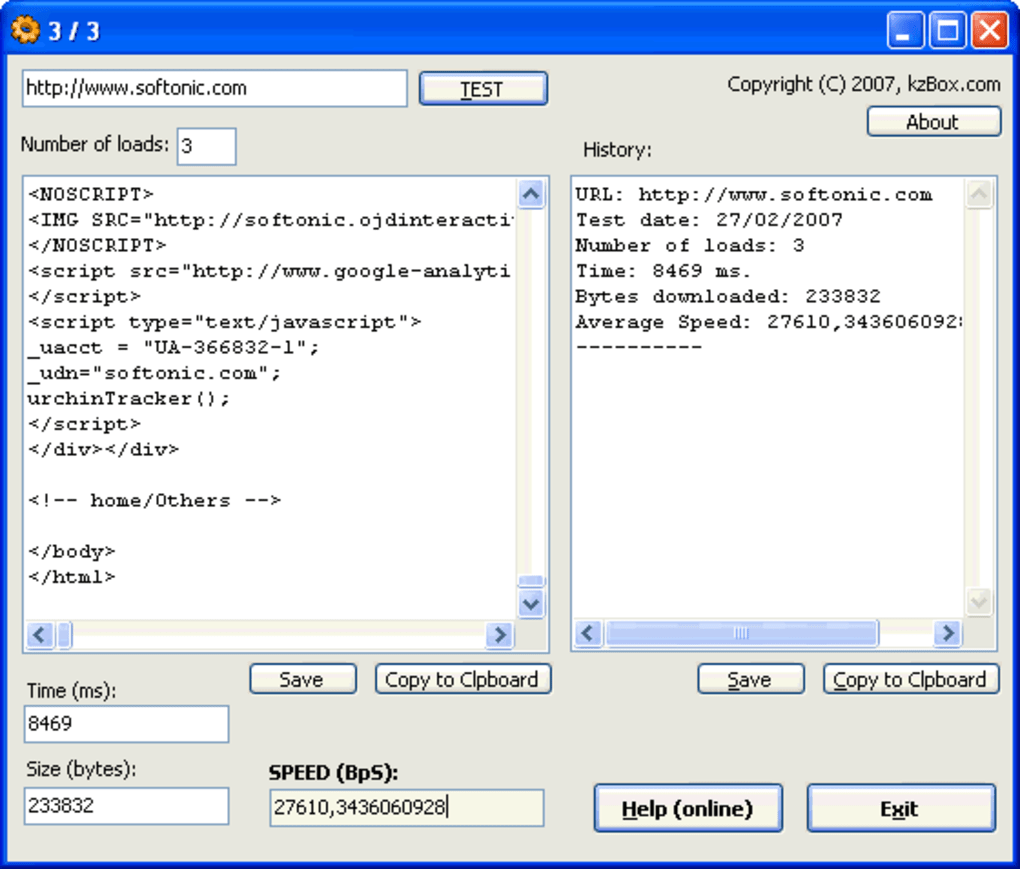
- Run a Test: In the main window, paste the full URL of the website you wish to evaluate (e.g., https://www.example.com). Click the “Start Test” button.
- Interpret Results: After a few seconds, the program displays the average download speed in kilobits per second (kbps) and megabits per second (Mbps). For deeper analysis, click “Export” to save the data.
- Repeat as Needed: For more accurate insights, run the test at different times of day or from different network connections.
Because the software does not require administrative privileges on most systems, you can install it on shared workstations without impacting other users. Regular updates are not mandatory—version 1.0 has proven stable for over a decade, but you can always check the developer’s site for patches or enhancements.
Compatibility, Pros & Cons
Site Speed Tester is built for Windows 2000 and earlier operating systems, making it one of the few modern tools that still supports legacy environments. It runs smoothly on 32‑bit architectures and does not rely on .NET Framework or other heavyweight runtimes, which further reduces compatibility concerns.
Pros
- Free to download and use with no hidden charges.
- Extremely low system requirements—ideal for older PCs.
- Fast, one‑click testing process.
- No ads, telemetry, or bundled software.
- Exportable results for documentation or reporting.
Cons
- Interface looks dated compared to modern tools.
- Lacks advanced analytics (e.g., waterfall charts).
- No native support for macOS, Linux, Android, or iOS.
- Last official update was in 2007; community support is limited.
- Only measures download speed; does not assess latency or DNS lookup time.
Frequently Asked Questions
Is Site Speed Tester safe to install on my computer?
Yes. The program is freeware with no bundled adware or spyware. It has been distributed through reputable download portals for over a decade, and the installer is digitally signed for Windows 2000 compatibility.
Can I test HTTPS sites with Site Speed Tester?
Absolutely. The tool supports both HTTP and HTTPS URLs. Simply enter the full address, and the program will handle the secure connection automatically.
What does the “average download speed” actually measure?
It calculates the amount of data transferred from the web server to your computer over a short period, then divides that total by the elapsed time. The result is presented in kilobits per second (kbps) or megabits per second (Mbps), giving you a practical view of how quickly a page’s assets are delivered.
Do I need an internet connection to use Site Speed Tester?
Yes. The application works by contacting the target website, so an active internet connection is required for each test. However, the software itself does not need a persistent online license or activation.
Can I automate speed tests for multiple URLs?
The free version does not include batch processing, but you can script repetitive runs using Windows command‑line parameters or by creating a simple batch file that launches the executable with different URLs.
Conclusion & Call to Action
Site Speed Tester remains a solid choice for anyone who needs a quick, no‑frills method to gauge website download performance on older Windows machines. Its free price tag, tiny footprint, and straightforward operation outweigh the modest visual design and limited analytics. If you’re managing legacy systems, need a portable speed‑checking tool, or simply prefer a tool that does one thing exceptionally well, this application deserves a spot in your toolkit. Download Site Speed Tester now to start measuring page speeds instantly—no registration, no cost, just reliable data.
Pros: Free, lightweight, easy to use, exportable results.
Cons: Outdated UI, limited to Windows 2000, no advanced metrics.







